 8PC
Start 8PC
What Is 8PC? A Free Web OS With Real Apps in Your Browser
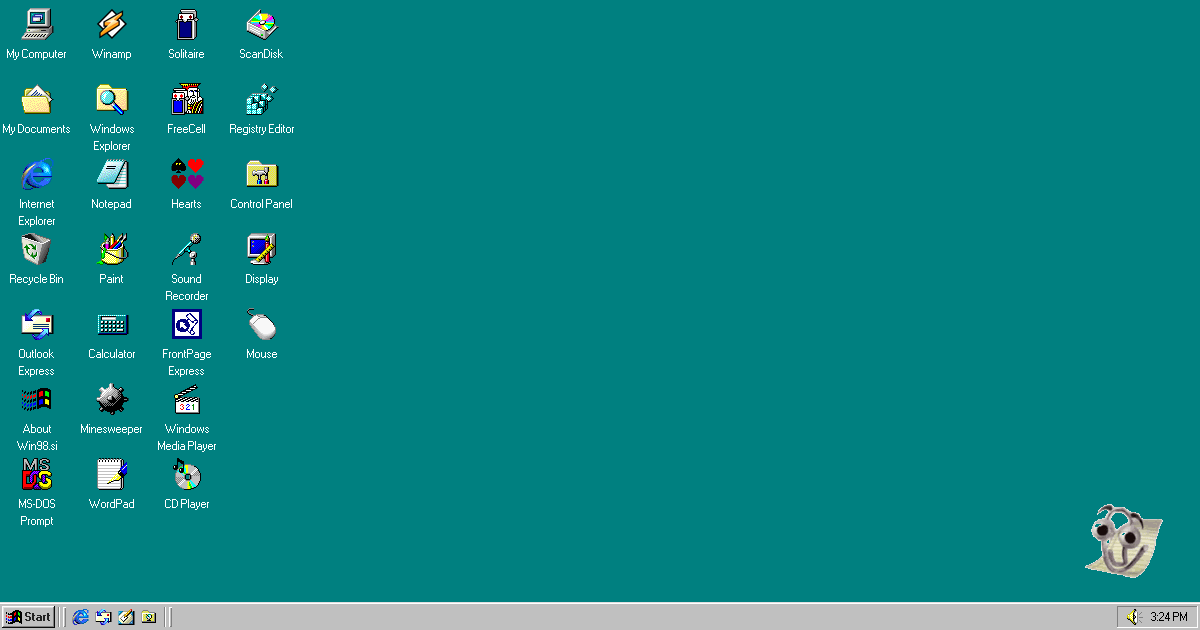
8PC is a computer you open in a browser tab. Press the power button and a full desktop appears, with windows, a taskbar, a Start menu, a Control Panel and more than fifty apps that really work. There is nothing to download, nothing to install and no account to create. This post explains what makes it different from other "desktop in a browser" projects, and why you might want to keep it in a pinned tab.
A real OS, not a screenshot
The look borrows from the classic desktop, but 8PC is not an emulator and not a virtual machine. Every program is written for the web, so it starts instantly and works on whatever device you already have. Windows can be dragged, resized, minimized to the taskbar and maximized; right-click menus, keyboard shortcuts and drag and drop behave the way you expect from a desktop.
It also means 8PC does not run .exe files. In exchange you get programs that open in a fraction of a second and share one consistent interface.
Your files stay with you
Your drive lives in your own browser. Documents, settings, the wallpaper and the position of your desktop icons survive a reload, and nothing is uploaded to a server. No one else can see what you save.
Because a browser can be cleared by accident, 8PC includes Backup (Start > Programs > Accessories > System Tools > Backup). It packs your whole computer into one .8pcbak file that you can keep anywhere, and restore later on this browser or another one.
Tools that only exist here
Next to the classics, 8PC has a growing set of original programs built for today:
- Scribe: a quiet Markdown and text editor with autosaved drafts, full screen mode and an AI writing assistant.
- Readman: a calm book view for PDF, EPUB, MOBI, FB2, comics, DOCX, Markdown and HTML, with contents, bookmarks and search.
- Sheets: a spreadsheet with formulas, several worksheets and charts that opens XLSX, CSV and TSV files.
- Words: a word processor with styles, tables, headers and footers, and
.docand.rtffiles. - ZipCat: create and open ZIP, TAR and GZ archives, and browse 7z, RAR, ISO and more. Nothing leaves your device.
- MediaBox and TTPlayer: your own videos and music, with playlists, subtitles and synced lyrics.
- picDone Studio: crop, resize and adjust pictures in a window on the desktop.
They are not demos. Each one opens real files from your computer, saves to your private drive and works offline once 8PC is installed.
Travel back in time
The Internet Time Machine lets you pick a website and a date and see the page as it looked years ago, using the Internet Archive. It also lives inside the Surfing browser as View > Wayback Machine. It is a surprisingly good way to remember what your first favourite site looked like.
And if you like the feeling of an old-school computer, type qbasic at the MS-DOS Prompt or in Start > Run to write programs with graphics and sound, or take a break with Minesweeper and Paint.
Works the way you work
- On any device: touch input works, so a phone or tablet can use it too.
- Offline: install 8PC as an app from your browser and it keeps working without a connection.
- AI helpers: built-in assistants such as the one in Scribe show a friendly offline message when no connection is available.
- Free: no sign-up and no install.
Try it
Press the power button on 8PC.net, log on with any name (the password can stay empty) and open the Start menu. If you want a guided first project, the MediaBox guide takes about two minutes, and all programs are listed in the directory.
My Infinity PC: Explore Time, Words & Infinity.